Next.js Data Fetching and Server Actions – Complete Guide

Hey there! I'm a tech enthusiast, developer, and lifelong learner who loves exploring the world of code over a good cup of coffee. ☕💻 Whether it’s software development, AI, DevOps, or debugging tricky bugs, I enjoy sharing insights and learning along the way.
Join me on Code & Coffee as we break down complex tech topics, one sip at a time! 🚀
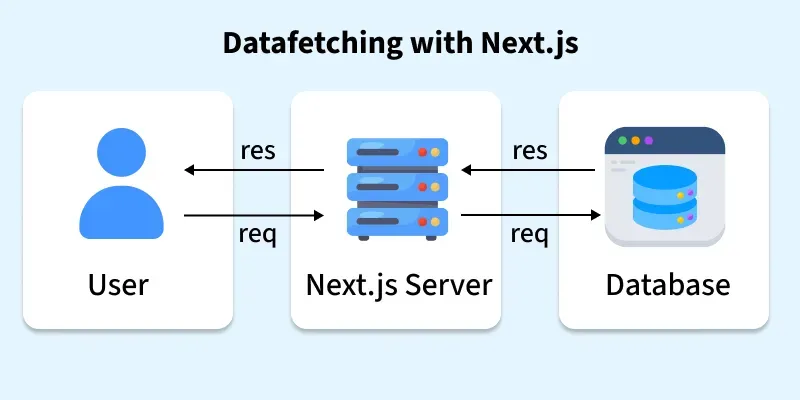
Next.js provides multiple ways to fetch and render data in your web applications. Proper data fetching ensures fast performance, SEO-friendliness, and an excellent user experience. Next.js supports Static Site Generation (SSG), Server-Side Rendering (SSR), Dynamic Routes, Client-Side Fetching, and Server Actions.
Next.js data fetching allows your app to get data from:
APIs
Databases
Other servers
It can be used for pre-rendering pages, dynamically loading content, or performing server-side operations.
Key Benefits:
Fast and optimized for performance
Works with both static and dynamic content
SEO-friendly because pages can be server-rendered
Developer-friendly with built-in API support
Data Fetching Methods in Next.js
01. Server-Side Rendering (SSR) – getServerSideProps
Static Site Generation (SSG) is a method in Next.js where pages are pre-rendered at build time. The HTML is generated once during the build and then served to all users as static files. The page doesn’t need to be generated on each request, making it very fast.
Ideal for pages where content doesn’t change often:
Blogs
Marketing/landing pages
Product listings
Documentation pages
Example: Displaying a single blog post
// pages/posts/[id].js
import Link from 'next/link';

export default function Post({ post }) {
  return (
    <div>
      <h1>{post.title}</h1>
      <p>{post.body}</p>
      <Link href="/">Go back to homepage</Link>
    </div>
  );
}

export async function getServerSideProps({ params }) {
  const res = await fetch(`https://jsonplaceholder.typicode.com/posts/${params.id}`);
  const post = await res.json();

  return { props: { post } };
}
How It works:
Next.js runs
getStaticPropsduring the build process.It fetches data from an API, database, or other sources.
Pre-renders the page into static HTML with the fetched data.
The generated HTML is served to every user visiting the page.
02. Server-Side Rendering (SSR) – getServerSideProps
Server-Side Rendering (SSR) is a method where Next.js generates the HTML on the server for every request. This ensures that the page always shows fresh and up-to-date content. Unlike SSG, the HTML is not pre-built at deployment but created dynamically when a user visits the page.
SSR is ideal for pages that require frequently updated data or user-specific content:
Dashboards with real-time stats
User profiles or account pages
News feeds or dynamic content
Pages where SEO is important but data changes often
Using getServerSideProps:
A user requests a page.
Next.js runs
getServerSidePropson the server for that request.The server fetches the necessary data (from APIs, databases, etc.).
Next.js generates HTML with the fetched data.
The HTML is sent to the browser, and the page is fully rendered.
Example:
// pages/posts/[id].js
import Link from 'next/link';

export default function Post({ post }) {
  return (
    <div>
      <h1>{post.title}</h1>
      <p>{post.body}</p>
      <Link href="/">Go back to homepage</Link>
    </div>
  );
}

// Fetch data on every request
export async function getServerSideProps({ params }) {
  const res = await fetch(`https://jsonplaceholder.typicode.com/posts/${params.id}`);
  const post = await res.json();

  return { props: { post } };  // Passed to the component as props
}
getServerSidePropsruns for each user request, ensuring fresh data.params.idcomes from the dynamic route[id].postis passed as props to the page component.
03. Dynamic Routes with getStaticPaths
Dynamic routing allows creating pages for variable paths like /user/1, /user/2.
How getStaticPaths Works
getStaticPathsis used with Static Site Generation (SSG) for dynamic pages.It tells Next.js which dynamic pages to pre-render at build time.
Returns an array of paths and a
fallbackoption.
Example:
export async function getStaticPaths() {
  const res = await fetch('https://jsonplaceholder.typicode.com/users');
  const users = await res.json();

  const paths = users.map(user => ({
    params: { id: user.id.toString() }, // id must be a string
  }));

  return { paths, fallback: false };
}
paths= all the dynamic URLs to pre-render.fallback: false= any path not returned here will show a 404 page.
How getStaticProps Works with Dynamic Routes
getStaticPropsfetches data for each dynamic path returned bygetStaticPaths.Runs at build time for each page.
Example:
export async function getStaticProps({ params }) {
  const [userRes, postRes] = await Promise.all([
    fetch(`https://jsonplaceholder.typicode.com/users/${params.id}`),
    fetch(`https://jsonplaceholder.typicode.com/posts?userId=${params.id}`)
  ]);

  const [user, posts] = await Promise.all([userRes.json(), postRes.json()]);

  return { props: { user, posts } };
}
params.idcomes from the dynamic route[id].Fetches the user data and their posts, then passes them as props to the page component.
04. Client-Side Data Fetching
Client-side data fetching means fetching data after the page has loaded in the browser. Unlike SSG or SSR, the initial HTML is rendered without the data, and the data is loaded dynamically on the client. This is useful when content changes frequently or depends on user interactions.
Ideal for pages where data:
Updates frequently (live feeds, stock prices)
Depends on user actions (search, filters, forms)
Doesn’t need to be SEO-indexed immediately
How It Works :
Typically done in Client Components using
useEffectanduseState.Data is fetched after the page renders.
You can also use libraries like SWR or React Query for caching, revalidation, and polling.
import { useEffect, useState } from 'react';

export default function Posts() {
  const [posts, setPosts] = useState([]);  // Store fetched data

  useEffect(() => {                         // Runs after the page loads
    fetch('https://jsonplaceholder.typicode.com/posts')
      .then(res => res.json())
      .then(data => setPosts(data));       // Save data to state
  }, []);                                   // Empty dependency array = run once on mount

  return (
    <ul>
      {posts.map(post => <li key={post.id}>{post.title}</li>)}
    </ul>
  );
}
useState([])initializes the posts array.useEffect()runs once on component mount.fetch()gets the data from the API.setPosts(data)updates the component state.Component re-renders automatically with the fetched posts.
Server Actions in Next.js
- Server Actions are a new feature in Next.js that allow you to run server-side logic directly from a Client or Server Component.
They are useful for operations that should not run in the browser, like:
Form submissions
Data updates or mutations in a database
Authentication
Background tasks (emails, notifications)
Server Actions let you keep sensitive logic on the server while triggering it from the client.
Using Server Actions in a Client Component
- Create a server action (runs on the server):
// formSubmitServerAction.js
'use server'; // Marks this function as a server action

export async function formSubmit(formData) {
  // Example: Save data to database
  console.log('Server received:', formData.get('name'));
}
- Call it from a Client Component using a form:
// src/app/page.js
'use client';
import { formSubmit } from './formSubmitServerAction';

export default function Page() {
  return (
    <form action={formSubmit}>
      <input type="text" name="name" placeholder="Enter Name" required />
      <button type="submit">Submit</button>
    </form>
  );
}
When the user submits the form,
formSubmitruns on the server, not in the browser.No API route is required – Server Actions handle the server logic directly.
Using Server Actions in a Server Component
Server Actions can also be defined inside a Server Component:
export default function Page() {
  async function formSubmit() {
    'use server';
    // Server-side logic: e.g., save data, send email
  }

  return (
    <form action={formSubmit}>
      <input type="text" name="email" placeholder="Enter Email" required />
      <button type="submit">Submit</button>
    </form>
  );
}
- Works similarly to client-triggered actions but defined locally in the Server Component.
Advantages of Server Actions :
Security – Sensitive operations (database writes, API keys) stay on the server.
Simplified architecture – No need for separate API routes for simple operations.
Flexible – Can be used in both Server Components and Client Components.
Easy form integration – Works directly with form submissions.
Efficient – Reduces client-side JS and simplifies data flow.
Choosing the Right Data Fetching Method
| Method | When to Use |
| getStaticProps (SSG) | Content that rarely changes, blogs, product pages |
| getServerSideProps (SSR) | Frequently updated content, dashboards, personalized pages |
| getStaticPaths | Dynamic routes with pre-rendered pages for SEO |
| Client-side fetching | Live data updates, user interactions, dynamic content |
| Server Actions | Secure server operations, form submissions, mutations |
Setting Up a Next.js App for Data Fetching
npx create-next-app@latest my-app
cd my-app
npm run dev
Use App Router for modern Next.js features.
Install SWR if you plan to use client-side data fetching.
Organize API routes inside
pages/api/or use server actions for backend logic.
Next.js provides flexible data fetching strategies to suit any type of web application:
Pre-rendered static pages for speed and SEO
Server-rendered pages for dynamic content
Client-side fetching for live updates
Server actions for secure operations
By choosing the appropriate method, you can optimize performance, user experience, and maintainability in your Next.js application.


